
Ohio has 88 counties. Each one runs its own sheriff sale schedule. If you're manually checking county websites every week for new listings, you already know the problem: it's slow, it's tedious, and you will miss things. Sheriff sale alerts solve this. AuctionScout's Smart Alerts let you set your criteria once and get notified automatically when new listings match, across any combination of Ohio's 88 counties.
Below: how to set up your first alert, what to do when a match comes in, and how to refine your filters over time.
Why manual county checking doesn't work
Let's be honest about the math. If you're watching five counties, that's five different websites to check. Some counties post new listings on Monday. Some update on Wednesday. A few don't follow any predictable schedule. You're spending 30 to 45 minutes a week just checking whether anything new came up, and half the time there's nothing.
Worse, the listings you care about (the ones matching your buy box for price, location, and property type) might be two out of 50 in a given week. You're scrolling through everything to find the two that matter.
And then there's timing. A property gets listed on Tuesday. You check on Friday. By then, someone else has already pulled the case file, driven by the property, and started their due diligence. In competitive counties like Cuyahoga or Franklin, three days can matter.
Smart Alerts work the other way. You tell us what you're looking for, and we email you when it shows up. No checking required.
What you need before setting up alerts
Not much:
- An AuctionScout account. The Free plan works for browsing listings and recap pages, but Smart Alerts are a Pro feature ($49/mo, 14-day free trial, no credit card required for the trial).
- A rough buy box. You should have some idea of which counties you want to watch, what property types interest you (single-family, multi-family, commercial, vacant land), and a price range. Don't worry about being perfect here. You can adjust everything later.
- An email address you actually check. Alerts get delivered by email. If your inbox is a graveyard, this won't help.
That's it. No complicated setup.
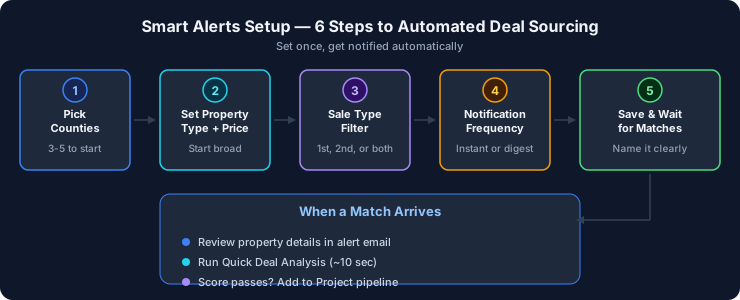
Step 1: Pick your counties
After logging in, head to the Smart Alerts section from your dashboard.
Click "Create New Alert." The first thing you'll set is which counties to monitor. You can pick one, several, or all 88. Most investors start with three to five counties they already know.
If you're not sure which counties to watch, check the county recap pages first. Each recap shows weekly volume, sale rates, and pricing trends. Counties with higher volume give you more at-bats. Counties with lower sale rates (meaning fewer properties are actually selling) can signal less competition.
For example, if you're in Northeast Ohio, you might start with Cuyahoga, Summit, and Stark. Central Ohio investors often watch Franklin, Delaware, and Licking. Southwest Ohio? Hamilton, Butler, Montgomery.
Pick your counties and move to the next step.
Step 2: Set your property type and price filters
This is where you define your buy box. Smart Alerts let you filter on:
- Property type. Single-family residential, multi-family (2-4 units), commercial, vacant land, or all of the above.
- Appraised value range. Set a minimum and maximum. This filters based on the county's appraised value for the property, which is also what determines the two-thirds minimum bid on first sales (ORC 2329.20) and the deposit amount (ORC 2329.211).
- Sale type. First sale only, second sale only, or both. This matters. First sales have the two-thirds minimum bid requirement. Second sales (ORC 2329.52) have no minimum, so you could pick something up below that threshold. Some investors specifically want second-sale alerts because the pricing dynamics are different.
A practical starting point: if you're looking for single-family flips in the $50K to $200K appraised range, set those filters. You'll get notified only when a single-family property in that range shows up in your selected counties. Everything else gets filtered out.
Don't set your filters too tight on the first try. You can always narrow them after you've seen a few weeks of alerts. Too tight and you might get zero notifications, which tells you nothing.
Step 3: Choose your notification frequency
Smart Alerts can notify you in two ways:
- Instant. You get an email as soon as a matching listing is detected. Best if you're in a competitive market and want to be early.
- Daily digest. One email per day summarizing all new matches from the last 24 hours. Cleaner inbox, still timely enough for most investors.
If you're watching high-volume counties like Cuyahoga or Franklin, the daily digest keeps your inbox manageable. If you're watching a quieter county like Tuscarawas or Knox, instant alerts won't overwhelm you because there just aren't that many listings.
Pick whichever fits your workflow. You can change it anytime.
Step 4: Save your alert and wait for the first match
Name your alert something useful. "NE Ohio SFR under $150K" is better than "Alert 1." If you set up multiple alerts later (and you probably will), clear names save you from confusion.
Hit save. Your alert is now active.
What happens next depends on your counties and filters. High-volume counties might trigger a match within a day or two. Quieter counties or very narrow filters might take a week. Either way, you don't need to check anything. That's the whole idea.
Step 5: What to do when you get a notification
Your alert email arrives. It shows the property address, county, appraised value, minimum bid, sale date, and sale type. You click through to the property detail page on AuctionScout.
From here, you can run a Quick Deal Analysis. That's AuctionScout's AI-driven evaluation that pulls comparable sales, estimates after-repair value, projects renovation costs, and scores the property as a flip, rental, or wholesale candidate. It takes about 10 seconds.
Quick Deal Analysis gives you a fast read on whether this property is worth your time. A high Deal Score (say, 7+ out of 10) means the numbers look good relative to other properties we've analyzed in that county. A low score doesn't necessarily mean it's bad, just that the numbers are tighter or the comps are thinner.
If the property passes your initial sniff test, you can add it to a Project. Projects are AuctionScout's way of organizing properties you're actively evaluating. It's basically a deal pipeline. Track where you are in due diligence, add notes, keep everything in one place instead of scattered across spreadsheets and browser tabs.
Step 6: Refine your alerts over time
After a few weeks, you'll know whether your filters are too broad or too narrow.
Getting too many alerts? Tighten the price range or narrow to fewer counties. Getting none? Expand your criteria. Maybe add a county you hadn't considered, or include second sales if you were only watching first sales.
You can also create multiple alerts. Some investors run separate alerts for different strategies. One alert for single-family flips under $150K in three counties. Another for multi-family rentals in a broader range. Each alert has its own criteria and sends its own notifications.
There's no limit on the number of alerts you can create on Pro.
Common mistakes to avoid
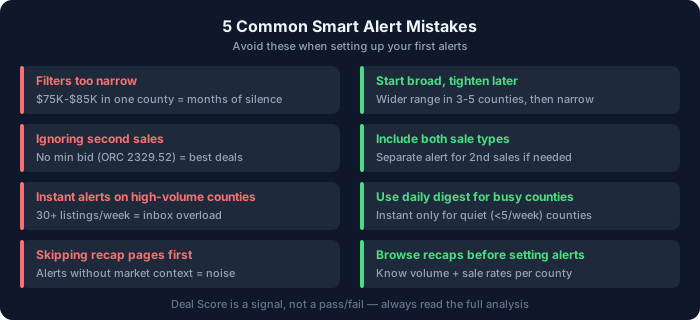
Setting filters too narrow from the start. If you set your range to $75K-$85K appraised value in a single county, you might wait months for a match. Start broader, learn the market, then tighten.
Ignoring second sales. A lot of newer investors only watch first sales. Second sales have no minimum bid (ORC 2329.52), which means properties can go for well below two-thirds of appraised value. Some of the best deals we've tracked across our data came from second sales.
Not checking the recap pages first. Before you set up alerts, spend 10 minutes browsing the recap pages for your target counties. Look at weekly volume and sale rates. If a county only has two or three sales per week, you might want to add neighboring counties to keep your deal flow up.
Setting instant alerts on high-volume counties and then ignoring the emails. If Cuyahoga is dropping 30+ listings a week and your filters are broad, instant alerts will flood your inbox. Switch to daily digest or tighten your criteria.
Treating the Deal Score as a pass/fail. A 6.5 isn't a "fail." It means the projected margins are thinner or the comp data is less certain. Read the analysis, don't just glance at the number.
FAQ
Do I need a Pro plan for Smart Alerts? Yes. Smart Alerts, Quick Deal Analysis, Batch Analysis, and Projects are Pro features. Pro is $49/mo with a 14-day free trial (no credit card required). The Free plan gives you access to all listings and the 88 weekly county recap pages, but not alerts.
How quickly do alerts fire after a new listing appears? We pull data from county sources continuously. Most alerts fire within a few hours of a new listing appearing. It's not real-time to the second, but it's same-day in almost every case.
Can I set alerts for specific addresses or parcels? Not currently. Alerts filter by county, property type, price range, and sale type. If you're watching a specific property, you can find it in the listings and add it directly to a Project.
What if I want to watch all 88 counties? You can. Select all counties in the alert setup. But you'll probably want to pair that with a tight price range or property type filter, otherwise you'll get a lot of notifications.
Do alerts cover both RealAuction online sales and in-person sales? Yes. We track all sheriff sales regardless of how the county conducts them. Most counties use RealAuction (mandated under ORC 2329.153), but the few that still do in-person components are covered too.
Set up your first alert
The whole setup takes about two minutes. Pick your counties, set your filters, choose instant or daily, done. Next time a property matches, you'll hear about it without opening a single county website.
If you're not on Pro yet, the 14-day free trial gives you full access to Smart Alerts and everything else. Sign up at auctionscout.app and build your first alert. Beats checking 88 county websites every Monday.